
Build
The inner loop
Author and iterate. An Intent starts from a Linear ticket, a request as written, or an agreed spec. Vibedata reads the Domain you already run, then takes that input to an approved spec. See how it works →
How it works
Your data engineering agent. It builds and maintains data pipelines on the platform you already run.

An Intent is what you intend to take to production. It survives chat turns and sessions, and carries its own agent, conversation, branch and workspace. Studio is the primary surface; Slack, Teams and other channels bind to the same Intent.

One Intent carries from build into operate, which is why a fix arrives with the spec and the run history that produced the thing it is fixing.
Build
Author and iterate. An Intent starts from a Linear ticket, a request as written, or an agreed spec. Vibedata reads the Domain you already run, then takes that input to an approved spec. See how it works →
Operate
Watch production, catch drift and resolve it. The observability that checks the build also watches production for anomalies, freshness and volume.

| Plane | Job |
|---|---|
| Ingestion & transformation | dlt and dbt as your platform's native objects: standard code you own. |
| CI gates | Checks a production merge cannot skip, plus a deploy lock. |
| Automations | Scheduled and event-driven headless runs, with or without an Intent. |
| Observability & cost | Quality and spend tracked across every Intent. |
| Compute management | A per-Intent ephemeral workspace, built natively on each platform. |
| Credentials | A broker issues short-lived scoped keys; agents hold no standing credential. |
| Context & knowledge | Skills, docs and memory persist across Intents, in your repository. |
| LLM Profiles | Per-Intent model-tiered routing, budgets and caps; MCP in both directions. |
A semantic branch holds code and data. Vibedata works inside isolated code, compute and data, with no write path to production. Each platform does it natively. We build the isolation and the agent inside it.


An Intent can switch modes mid-work.
One driver is accountable at a time, and presence shows who's on.

Isolation, guardrails and context are three of the four gaps. The fourth is cross-platform: the same loop, skills and gates on DuckDB, Microsoft Fabric and MotherDuck, built natively on each. Each Intent reads and writes on its platform.

A bad join drops a tenth of the rows and the dashboard still renders green. So every change runs independently against real data: tests, data diffs and reconciliation. CI gates production. The agent cannot pass the deploy lock behind it.

GitHub Issues carry detect-to-resolve work between the loops. CI and GitHub Issues are mechanisms; the work stays in Studio and other channels.


Vibedata takes business intent to a pull request through Requirements, Design, Plan, Build, Verify, Ship. A person approves requirements, design and plan, and merges the PR. It also fixes what it finds in production: it explains, investigates or remediates, at the depth the question needs, and asks before changing anything.

Vibedata watches the platform and raises breakages, quality violations, cost and drift as GitHub Issues.
Point the agent at a Spark notebook you already run, and it comes back as dbt and dlt on your platform.
Asset by asset, whenever the business next touches it. New work starts at Describe.

Model-tiered routing by default: each lifecycle stage goes to a model tier. Frontier tiers take specification, design and review; cheaper tiers, generation and checks. Pin a model for any Intent, or let the agent choose. The gate decides what ships.

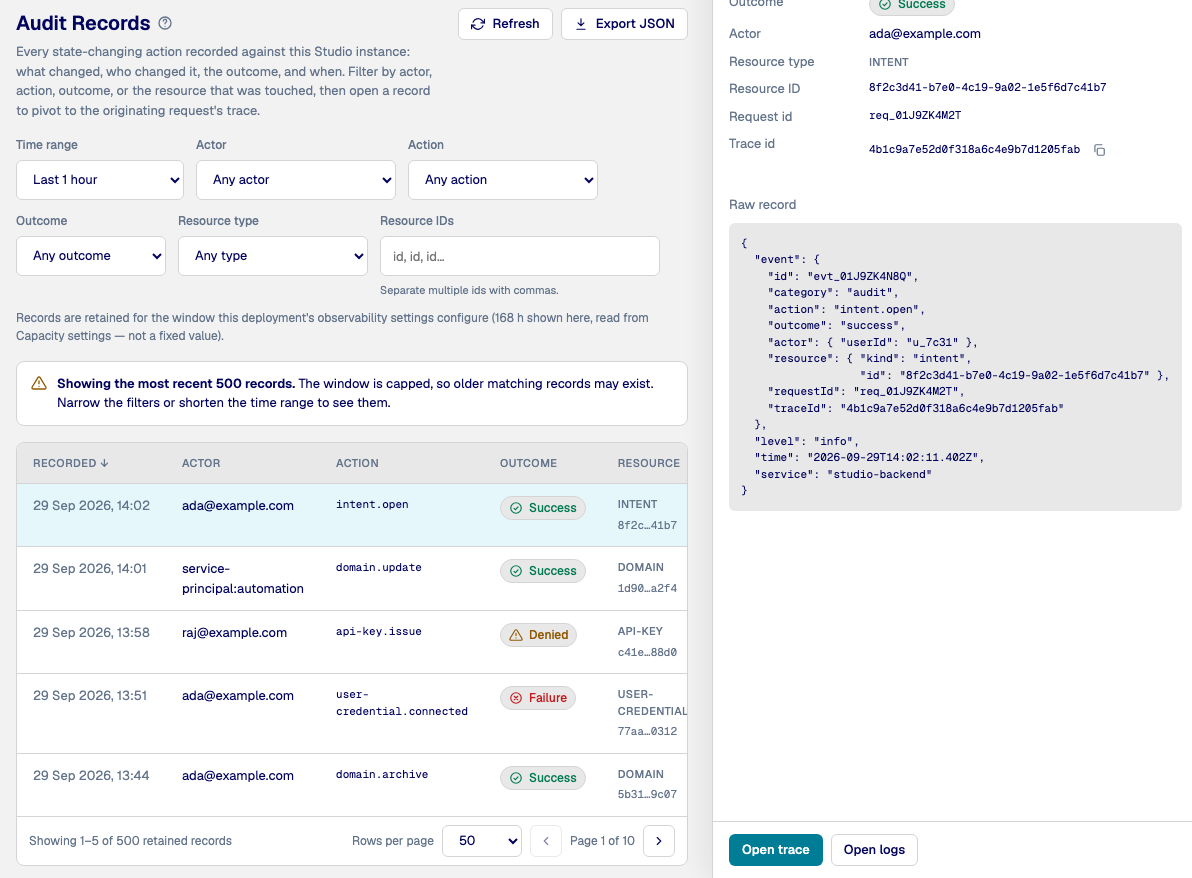
Studio records every agent tool call, every external call and every state-changing action: who drove it, what ran, the outcome and when. Filter by actor, action, outcome or resource, export the records as JSON, and open any record's trace.
Vibedata runs in your own tenant. The harness reads metadata, code and execution traces. It never reads your rows: data-slice profiling is your agent, on your compute. After the merge, your CI/CD deploys; on DuckDB, CI runs static checks only.

It runs one loop: Intent, Requirements, Design, Plan, Build, Verify and Ship. Ship is a pull request that a person merges. Each Intent runs on its own branch and workspace.
Whatever you have: a Linear ticket, a request as written, or an agreed spec. Vibedata takes it from there to an approved spec.
It explores your existing code and data first, then asks only the contextual questions it cannot settle. It profiles a data slice, then commits the requirements spec to git for you to approve.
Yes. It profiles a data slice on your compute: the candidate input, evidence on grain, join and metric columns, a sizing verdict and join expectations, committed to git.
A person approves the requirements, the design and the plan, and merges the pull request. Between build and production, CI runs deterministic gates and a deploy lock the agent cannot talk its way around.
Each Intent has its own branch, conversation and ephemeral workspace, and builds only the models it changes, reading the rest from production. Several Intents run unattended in parallel on separate branches of the Domain repository.
Model choice is model-tiered, set per lifecycle stage and per Intent under your own keys. Frontier tiers handle specification, design and review, and cheaper tiers handle generation and mechanical checks; you can pin a model for any Intent. The gate decides what ships, never a model.
Yes. It saves memory for you and for the Domain as it works. Terms go into CONTEXT.md, decisions into ADRs and designs into design records in your repository, so the next Intent starts with what the last one learned.
An Intent's workspace has no write path to production, and each Intent receives only the credentials it needs. It cannot reuse the deployment's other credentials, and a service principal cannot drive an Intent. Each Intent session runs as the person who currently holds the driver seat.
Yes. Vibedata reads runtime evidence and files triaged issues, and fixes only an allowed failure class with concrete evidence and a sandbox check. A fix that involves data loss, a decision or a wide blast radius goes back to a person.
You can set a monthly USD cap for the whole deployment and a narrower optional cap per Domain, and a run can be stopped when its run budget is exhausted. With no cap configured, that scope is unlimited. Model usage is recorded against the Intent, Domain and organization that own it; the cost shown is an estimate, not an invoice.
Several people can watch one Intent, but only one person drives it at a time. Sharing grants access to the Intent without handing over the current driver's authority. Pausing releases the driver seat.
Yes. An administrator makes an MCP deployment available, each user connects their own account, and an Intent session receives only the tools usable by the person driving it. Two users in the same Domain can see different tools.
Agent Readiness (ADER) measures your estate against thirteen dimensions in two groups: Safety (M1 to M8) asks whether an agent can act without breaking things, and Correctness (S1 to S5) asks whether it can be right. It measures the estate and rates no vendor or platform. Read the model.
Studio exposes permission-checked diagnostics over logs, metrics, traces and audit records, from a telemetry stack that runs in your own subscription.
Get started, or see it work first.